
WoW Forever Login Queue Stuck? 7 Fixes for Long Waits & Login Failures
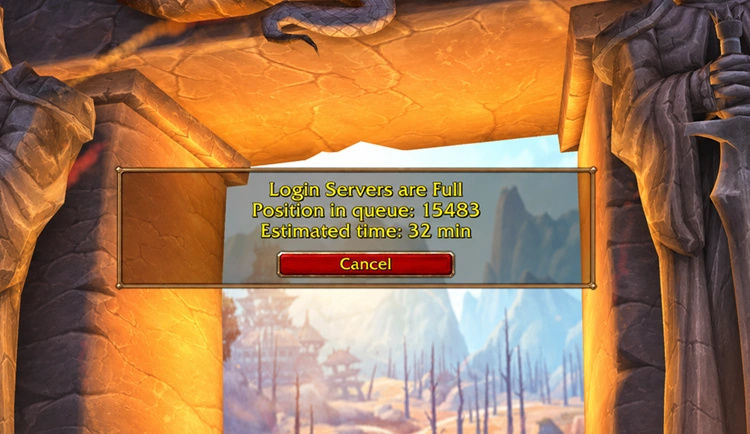
WoW Forever launched on November 4, 2026, but for some players, the journey to Azeroth begins with a frustrating wait. The WoW Forever login queue may freeze, reset unexpectedly, or end in a failed login. Even reaching the front can lead to a disconnect, sending you right back into another queue.
This guide will explain the possible causes, help you decide whether to keep waiting or restart your login, and provide seven practical fixes for queue and login issues.
Why Is the WoW Forever Login Queue Stuck or Login Failing?
Queue delays, login failures, and unavailable Rulesets can look similar but require different responses. Check the table below to find the first action for your symptom.
| Symptom | Possible Cause | First Fix |
|---|---|---|
| The queue is long, but your position keeps decreasing | Heavy login traffic | Stay in the queue and avoid unnecessary restarts |
| The queue stalls or resets unexpectedly | Login service issues or an expired session | Check Blizzard's service notices |
| Login fails with WOW51900328 | Server connection interruption | Check server status, then see the WoW Forever WOW51900328 guide |
| An account or game-access error appears | Wrong WoW account or missing game access | Verify the selected account and its access status |
| All Rulesets appear unavailable after the queue | Temporary Ruleset service issue | Check Ruleset availability before retrying |
| Login succeeds, but high ping or disconnects continue | Network instability or inefficient routing | Stabilize your connection with the WoW Forever high ping guide |
Should You Wait or Restart the WoW Forever Login Queue?
If your WoW Forever queue position is still decreasing, keep waiting - even an inaccurate wait-time estimate doesn't mean the queue is broken. If the position stops moving, check Blizzard's server status before restarting. If you've been disconnected or your login session has expired, consider logging in again, but remember that restarting may cost your place in line.
How to Fix WoW Forever Login Queue and Login Errors - 7 Useful Fixes
If the WoW Forever login queue remains stuck or login keeps failing, try these seven fixes in order, starting with server status before checking your account, client, and connection.
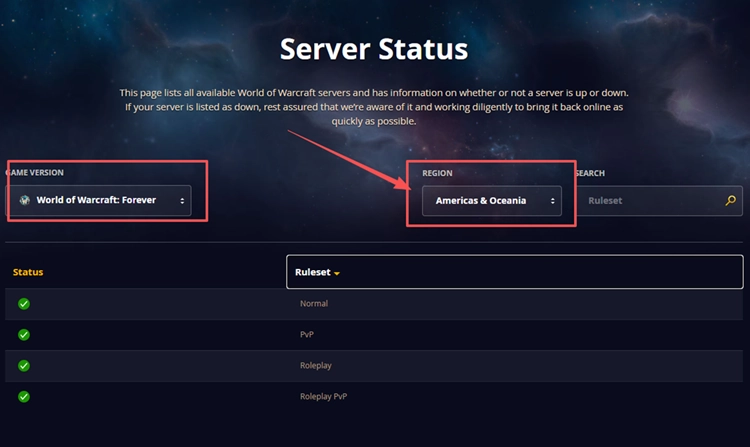
Fix 1. Check WoW Forever Server Status
Before changing anything on your PC, check the official WoW Forever server status and Blizzard’s Battle.net notices for maintenance or login-service disruptions. If the servers are experiencing issues, wait for an official update before retrying.
Fix 2. Restart WoW Forever and Battle.net After a Failed Login
If WoW Forever fails to log in or disconnects after the queue, your login session may have expired. Restarting WoW Forever and Battle.net can refresh the session and help resolve temporary login issues. Only restart after a failed login or disconnection, as closing an active queue may cost you your place.
Fix 3. Confirm Your WoW Account and Game Access
If WoW Forever shows an account or access error, check the WoW account selected above Play in Battle.net, especially if you have multiple accounts. Confirm World of Warcraft: Forever is the selected game version, then check Games & Subscriptions in Battle.net Account Management for an active subscription, Game Time, or valid temporary launch-code access before retrying.
Fix 4. Handle Unavailable Rulesets After the Queue
Getting through the WoW Forever login queue does not guarantee that every Ruleset is available. If Rulesets appear greyed out or show “This ruleset is temporarily unavailable,” check Blizzard’s Ruleset status and service notices first. Wait if availability is disrupted, as repeatedly logging out may send you into another queue without resolving the problem.
Fix 5. Update WoW Forever in Battle.net
An outdated game client or incomplete update can prevent WoW Forever from connecting properly, even when the servers are online. Make sure Battle.net has installed the latest available patch before trying to log in again. Follow the steps below to check for updates.
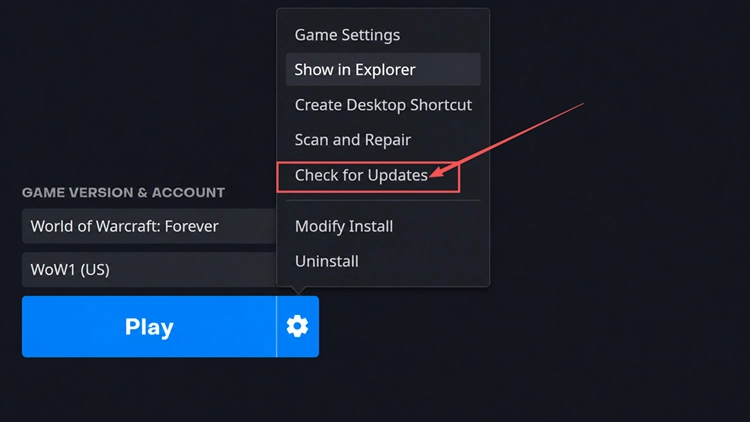
Step 1. Open Battle.net > World of Warcraft and select World of Warcraft: Forever under Game Version.
Step 2. Click the gear icon beside Play, select Check for Updates, and install any available update before relaunching the game.
Tip: If an update downloads slowly or gets stuck, try these WoW Forever slow download fixes.
Fix 6. Stabilize Your Internet Connection
If WoW Forever keeps disconnecting after login, unstable Wi-Fi or background network traffic may be affecting your connection. Improving local network stability can help reduce unexpected disconnects. Follow the steps below.
Step 1. Connect your PC directly to the router using an Ethernet cable instead of Wi-Fi, if possible.
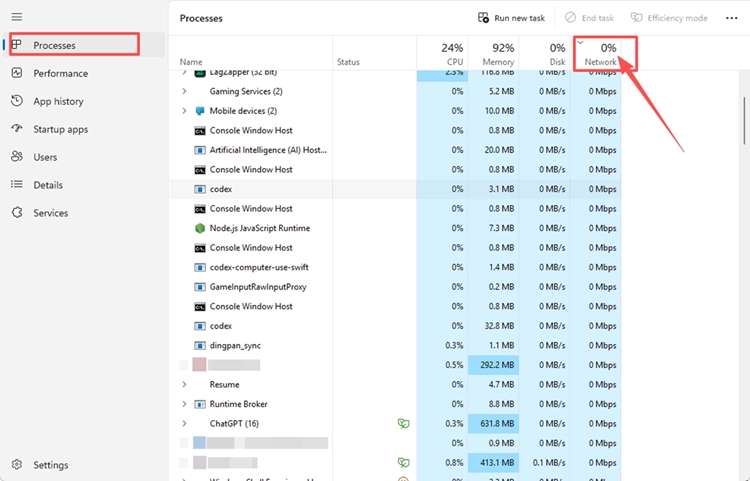
Step 2. Press Ctrl + Shift + Esc, open Task Manager > Processes, and check Network usage. Pause unnecessary downloads or cloud syncing.
Step 3. If disconnects continue, restart your router after leaving the game, then reconnect and test WoW Forever again.
Fix 7. Scan and Repair WoW Forever
If WoW Forever login errors persist after checking server status and updating the client, damaged or incomplete game files may be responsible. Battle.net’s Scan and Repair tool can detect and repair file problems. Follow the steps below.
Step 1. Open Battle.net > World of Warcraft, select World of Warcraft: Forever under Game Version, then click the gear icon beside Play and choose Scan and Repair.
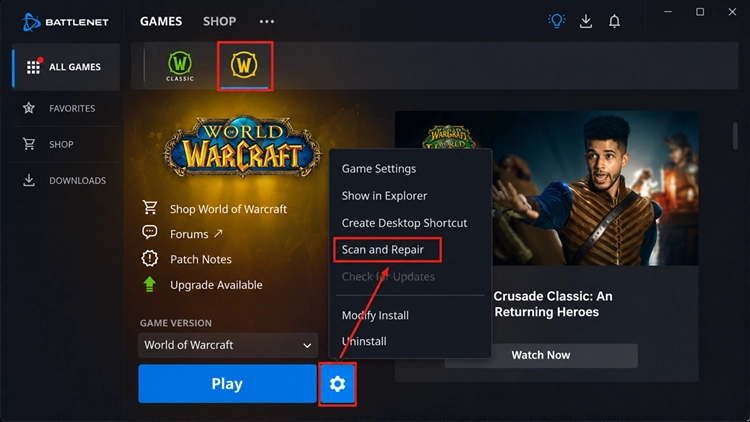
Step 2. Click Begin Scan, wait for the repair to finish, then relaunch WoW Forever and test the login again.
[Bonus] Improve WoW Forever Connection Stability With LagZapper
After getting through the WoW Forever login queue, high ping, packet loss, or unstable routing can still disrupt your adventures in Azeroth. LagZapper can optimize the connection route between your Windows PC and WoW Forever servers to help lower ping, reduce game lag, and improve connection stability.
Why Use LagZapper for WoW Forever?
LagZapper can help improve connection stability during WoW Forever quests, dungeons, and multiplayer activities:
- Smart Route Optimization: Finds faster and more stable routes to game servers, helping reduce high ping, packet loss, jitter, and unstable routing.
- Reduce Lag & Improve Stability: Helps lower ping, reduce game lag, minimize ping spikes, and improve responsiveness during exploration, combat, and multiplayer sessions.
- One-Click Boost: Optimizes your game connection without requiring manual changes to complicated network, DNS, or router settings.
- Support for 3,000+ Games: LagZapper supports WoW Forever and thousands of other popular online games across multiple genres.
How to Boost WoW Forever With LagZapper
Follow these three steps to optimize your PC connection before launching WoW Forever.
Step 1. Download and Install LagZapper
Download LagZapper for Windows and follow the on-screen instructions to complete the installation on your PC.
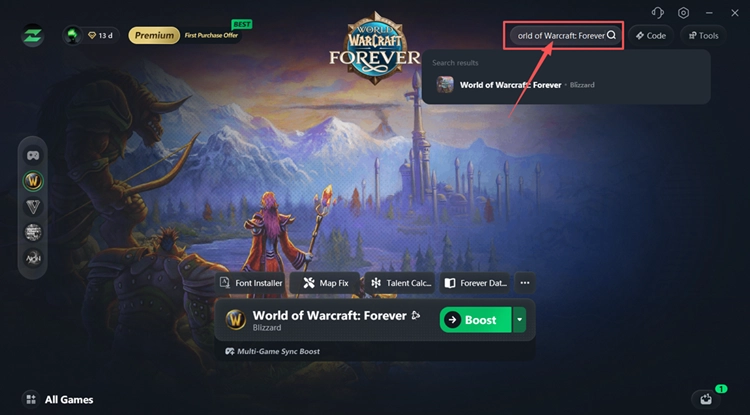
Step 2. Search for WoW Forever
Launch LagZapper, sign in, and search for World of Warcraft: Forever in the search box.
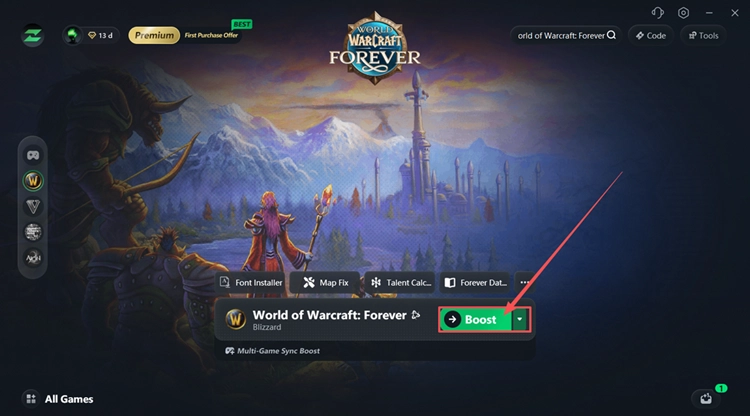
Step 3. Select a Server and Click Boost
Choose a recommended server or node, click Boost, then launch WoW Forever through Battle.net.
The Bottom Line
If your WoW Forever login queue is moving, keep waiting to avoid losing your position. For stuck queues or unexpected resets, check Blizzard's server status first. If login fails, verify your account access, update the game, and try the remaining fixes as needed. For high ping or packet loss after login, players can download LagZapper to help lower ping, reduce game lag, and improve connection stability.
FAQs About WoW Forever Login Queue
Q1. Why Is the WoW Forever Login Queue So Long?
Heavy login traffic can create long queues when many players attempt to connect at the same time.
Q2. Is the WoW Forever Queue Stuck or Just Moving Slowly?
If your position stops changing for an extended period, check Blizzard's service notices before restarting.
Q3. Is the WoW Forever Queue Time Accurate?
The displayed queue time is an estimate that can increase or decrease as login traffic changes.
Q4. What Causes the WoW Forever Login Failed Error?
An expired login session, incorrect account access, or temporary service disruption may prevent successful login.
Q5. Where Can I Check WoW Forever Server Status?
Visit Blizzard's official WoW Forever server-status page and check Battle.net notices for maintenance or outages.
Q6. Can Network Instability Cause WoW Forever Login Issues After Connecting?
Yes. Unstable Wi-Fi or network congestion can cause disconnects. Try Ethernet, pause downloads, or restart your router.