
WoW Forever Name Reservation Not Working? Delay & Login Fixes
WoW Forever name reservation not working after the October 27 opening? Players have reported login failures, a greyed-out Battle.net Play button, unavailable Rulesets, and repeated disconnects during character name reservation. Blizzard also displayed a "Name Reservation Delayed" notice following technical issues in the EU region.
North American players have also reported login queues and connection problems. This guide covers the latest WoW Forever name reservation status, common causes of delays and disconnects, and six practical fixes for Battle.net login and connection issues.
Is WoW Forever Name Reservation Down or Delayed?
WoW Forever name reservation was delayed by technical issues during the October 27 opening. EU players reported unavailable Rulesets, greyed-out Play buttons, and login failures. Blizzard later displayed a "Name Reservation Delayed" notice in Battle.net. NA players also reported login queues and disconnects, though some successfully reserved their names.
According to Blizzard's official announcement, the scheduled opening times were:
| Region | Name Reservation Start | Reported Issues |
|---|---|---|
| Europe (EU) | Oct 27, 18:00 CET | Delayed access, Ruleset unavailable, Play button greyed out |
| North America (NA) | Oct 27, 1:00 PM PDT | Login queues, disconnects, intermittent access |
| Korea (KR) | Oct 28, 07:00 KST | No widespread issues confirmed |
| Taiwan (TW) | Oct 28, 07:00 CST | No widespread issues confirmed |
For reservation schedules, requirements, and character limits, see our WoW Forever Name Reservation guide.
Why Is WoW Forever Name Reservation Not Working?
WoW Forever name reservation not working can result from server delays, heavy traffic, Battle.net issues, unavailable Rulesets, or unstable connections.
1. WoW Forever Name Reservation Delayed
Blizzard displayed a "Name Reservation Delayed" notice following technical issues in the EU region. This server-side delay cannot be fixed by restarting or reinstalling the game.
2. Server Overload and Login Queues
Heavy traffic during the opening can cause long login queues, failed authentication, and disconnects before character creation.
3. WoW Forever Play Button Greyed Out
A greyed-out Battle.net Play button may result from an incorrect game version, outdated client, wrong login region, or temporary reservation restrictions.
4. WoW Forever Ruleset Unavailable
The "This ruleset is temporarily unavailable" message may appear due to server issues, Ruleset restrictions, or faction balance limits.
5. WoW Forever Name Reservation Disconnect
Repeated login disconnects and queue loops may result from server instability, local network interruptions, or poor network routing.
How to Fix WoW Forever Name Reservation Not Working
Try these six fixes to check your Battle.net setup, reservation eligibility, Ruleset access, and network connection.
Fix 1. Check WoW Forever Server Status
WoW Forever name reservation server down or delayed issues may require an official fix from Blizzard. Check the latest server status before troubleshooting.
Step 1. Visit Blizzard News and the WoW Forums for reservation updates.
Step 2. Open Battle.net and check for maintenance or delay notices.
Step 3. Wait for Blizzard to resolve confirmed server-side issues.
Players experiencing login failures, long queues, or disconnects can also check the WoW Forever server status for possible outages or maintenance.
Fix 2. Restart Battle.net and Check for Updates
An outdated Battle.net client or incorrect game version may prevent WoW Forever from launching.
Step 1. Close WoW Forever and Battle.net completely, then restart Battle.net.
Step 2. Select World of Warcraft and choose World of Warcraft: Forever under Game Version, not the Beta version.
Step 3. Click the cogwheel icon beside Play > Check for Updates, install available updates, and relaunch the game.
This may fix client-related issues but cannot resolve server-side delays.
Fix 3. Verify Name Reservation Eligibility
WoW Forever Early Name Reservation requires an eligible purchase on the correct Battle.net account.
Step 1. Sign in to Battle.net using the account associated with your purchase.
Step 2. Confirm you own an eligible edition: Skyborne Heroic Pack, Skyborne Epic Pack, or Warcraft Forever Collection.
Step 3. Select the correct WoW account and confirm that name reservation is open in your region.
Eligible players can reserve names for up to three characters across all Rulesets.
Fix 4. Fix WoW Forever Play Button Greyed Out
The WoW Forever Play button greyed out issue may be related to an incorrect Battle.net login region. Some EU players reported success after correcting their region settings.
Step 1. Sign out of Battle.net completely.
Step 2. On the login screen, use the region selector to choose your correct Battle.net login region.
Step 3. Sign in again and check whether the Play button is available.
This workaround cannot bypass official server delays or Ruleset restrictions.
Fix 5. Check WoW Forever Ruleset Availability
The WoW Forever Ruleset unavailable error may prevent character creation even after a successful login.
Step 1. Launch WoW Forever and open the Ruleset selection screen.
Step 2. Check your preferred PvP, Normal, or Role-Play Ruleset for availability notices or faction restrictions.
Step 3. Select another suitable Ruleset or check Blizzard's official updates before retrying.
Some PvP restrictions result from faction balance limits rather than server or connection issues.
Fix 6. Fix WoW Forever Name Reservation Disconnects
WoW Forever name reservation disconnect issues may result from unstable networks, packet loss, or poor routing.
Step 1. Restart your PC and router, then switch to a wired Ethernet connection.
Step 2. Pause background downloads and streaming, then check your connection for packet loss and high latency.
Step 3. Check that Battle.net services are available, then restart WoW Forever and try logging in again.
For persistent login disconnects, such as WoW Forever Error WOW51900328, try additional troubleshooting steps to restore your connection.
[Bonus] Improve WoW Forever Connection Stability With LagZapper
Server-side reservation delays require an official fix, but local network issues and unstable routing can also cause login disconnects. LagZapper helps optimize your connection to WoW Forever servers, reduce high ping, and minimize packet loss for more stable gameplay.
Why Use LagZapper for WoW Forever?
- Lower WoW Forever Ping: Reduce WoW Forever high ping caused by inefficient network routes.
- Reduce WoW Forever Packet Loss: Minimize packet loss and improve connection stability during gameplay.
- Optimize WoW Forever Routing: Find more stable network routes between your PC and game servers.
How to Boost WoW Forever With LagZapper
Follow these three simple steps to optimize your WoW Forever connection.
Step 1. Download and Install LagZapper
Download LagZapper for Windows and follow the installation instructions.
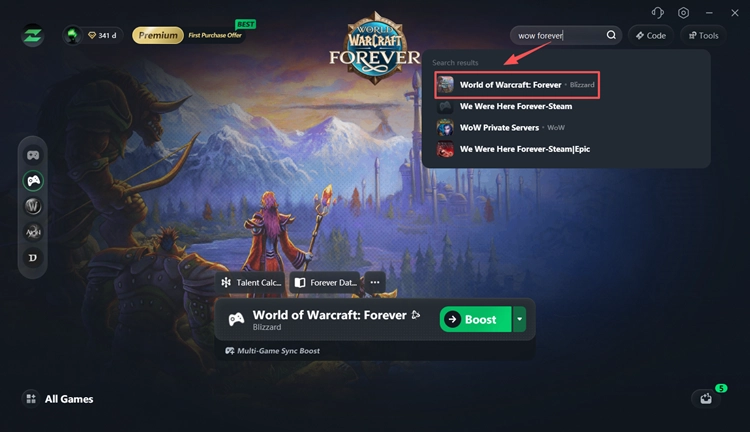
Step 2. Open LagZapper and Select WoW Forever
Launch LagZapper, sign in, and search for WoW Forever in the supported games list.
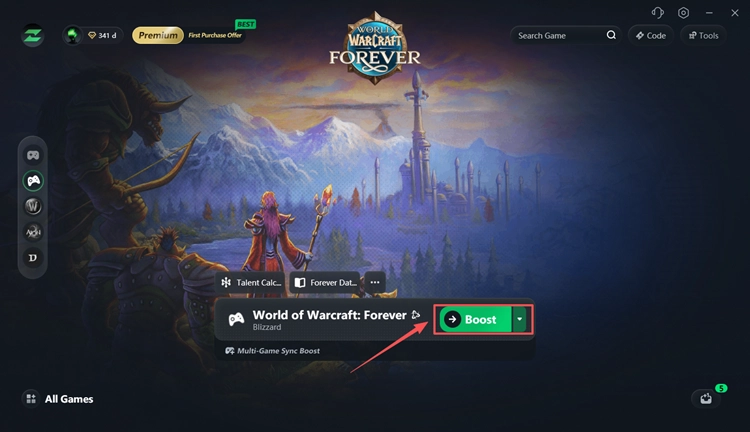
Step 3. Boost and Play WoW Forever
Select an available server or node, click Boost, and launch WoW Forever with an optimized connection.
The Bottom Line
WoW Forever name reservation not working can result from server delays, login queues, greyed-out Play buttons, or unavailable Rulesets. Both EU and NA players reported issues during the October 27 opening, though some later reserved their names successfully.
Check Blizzard's latest updates first, then verify Battle.net, account eligibility, and your connection. For persistent routing-related instability when servers are available, download LagZapper to help optimize your WoW Forever connection.
FAQs About WoW Forever Name Reservation
Q1. Why is WoW Forever name reservation not working?
Server delays, login queues, Battle.net issues, unavailable Rulesets, or account eligibility problems may prevent name reservation.
Q2. Is WoW Forever name reservation delayed?
Yes. Blizzard confirmed technical delays during the October 27 EU opening. Some players later regained access.
Q3. Why is the WoW Forever Play button greyed out?
An incorrect game version, wrong Battle.net login region, outdated client, or temporary access restrictions may cause this issue.
Q4. Why is WoW Forever Ruleset unavailable?
Server issues, temporary Ruleset restrictions, or faction balance limits may prevent character creation.
Q5. Why Does WoW Forever Keep Disconnecting?
Server overload, login instability, packet loss, or poor network routing may cause repeated disconnects.
Q6. When will WoW Forever name reservation be available again?
Early Name Reservation is scheduled through November 3, 2026. Blizzard has not confirmed a universal recovery time for the reported technical issues.