
WoW Forever Stuck on Retrieving Character List? 6 Fixes
Is WoW Forever stuck on Retrieving Character List after login? Some players reach the character screen but never see their characters, while others remain on a black screen with the loading icon spinning. Reports during the WoW Forever Beta suggest the issue can affect multiple players at once, especially during server updates or temporary service disruptions.
A WoW Forever character list not loading usually points to a server, Battle.net, game file, cache, or connection problem. Start by checking the server status. With the servers running normally, continue with the fixes below for WoW Forever retrieving character list, login stuck, or character select not loading issues.
Why Is WoW Forever Stuck on Retrieving Character List?
The Retrieving Character List message appears while WoW Forever loads character data from the game service. When that process fails, the character selection screen may stay stuck or never finish loading. Common causes include:
- WoW Forever server or character service issues.
- Server maintenance or a recent Beta update.
- Temporary Battle.net client issues.
- Corrupted or incomplete game files.
- WoW cache problems.
- An unstable connection to the game servers.
How to Fix WoW Forever Stuck on Retrieving Character List
Check the server status first. When the servers are running normally, continue with the Battle.net, game file, cache, and connection fixes below.
Fix 1. Check WoW Forever Server Status
Check recent WoW Forever announcements and Blizzard Forum reports for Retrieving Character List, maintenance, disconnects, queues, or login issues. When many players report the same problem at once, it is more likely related to the game servers or character service.
Tip: Also seeing queues or login errors? Check our WoW Forever servers down guide first.
Fix 2. Restart WoW Forever and Battle.net
A temporary Battle.net or game session issue can stop the WoW Forever character list from loading correctly.
Step 1. Close WoW Forever and exit Battle.net completely.
Step 2. Open Task Manager and end any remaining WoW Forever or Battle.net processes.
Step 3. Reopen Battle.net and launch WoW Forever again.
Fix 3. Wait After Maintenance or a Beta Update
WoW Forever may come back online before all character and login services are fully restored. Players can sometimes pass the login screen or queue, then get stuck on Retrieving Character List. This is more common after:
- Scheduled maintenance
- A WoW Forever Beta update
- A server restart
- A large disconnect event
When the issue starts right after one of these events, wait a short while and try again before changing game files or reinstalling WoW Forever.
Fix 4. Scan and Repair WoW Forever
When other players can log in normally but your WoW Forever character list is not loading, check the local game files.
Step 1. Open Battle.net and select World of Warcraft: Forever Beta.
Step 2. Click the gear icon next to Play, then select Scan and Repair > Begin Scan.
Step 3. Wait for the scan to finish, then launch WoW Forever again.
Scan and Repair is more useful when the servers are running normally. During larger server-side incidents, this fix may not resolve Retrieving Character List.
Fix 5. Clear the WoW Forever Cache
An outdated or damaged cache can sometimes prevent WoW Forever from loading character data correctly after an update.
Step 1. Close WoW Forever and Battle.net, then open the World of Warcraft installation folder.
Step 2. Open the WoW Forever Beta folder and rename the Cache folder to CacheOld.
Step 3. Reopen Battle.net and launch WoW Forever. The game will create a new cache automatically.
Note: Avoid changing the WTF or Interface folders unless further troubleshooting is needed.
Fix 6. Restart Your Network Connection
When WoW Forever servers are online but the character list is still not loading, restart your network connection.
Step 1. Restart your modem and router.
Step 2. Use Ethernet instead of Wi-Fi, and pause downloads, streaming, or other bandwidth-heavy tasks.
Step 3. Launch WoW Forever again and check whether the character list loads.
This fix is more useful when you also notice high ping, disconnects, or an unstable connection.
Also Read: WoW Forever Green Screen? Fix Green Maps & Black Textures
[Bonus] Improve WoW Forever Connection with LagZapper
When WoW Forever servers are running normally but the connection still feels unstable, the issue may be related to network routing between your PC and the game server. LagZapper is a Windows game booster designed to optimize game routes, helping reduce lag, lower ping, and improve connection stability during gameplay.
Highlights of LagZapper for WoW Forever
- Lower High Ping: Optimize game routing to help reduce WoW Forever high ping and improve response time.
- Reduce Lag Spikes: Keep the connection more stable to reduce lag during combat, loading, and character switching.
- Reduce Packet Loss: Optimize route quality to reduce packet loss, rubberbanding, and unexpected disconnects.
- Improve Connection Stability: Find a more stable route between your PC and the WoW Forever game server.
How to Use LagZapper for WoW Forever
Using LagZapper only takes a few steps:
Step 1. Download and Install LagZapper
Download and open LagZapper on your Windows PC.
Step 2. Search for WoW Forever
Search for WoW Forever and select the game from the game list.
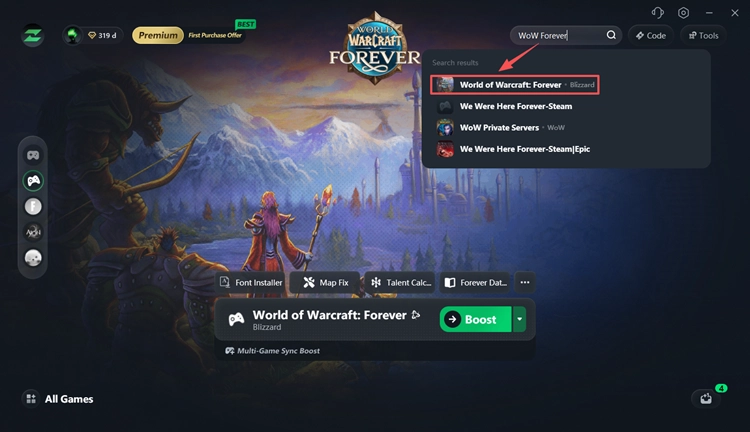
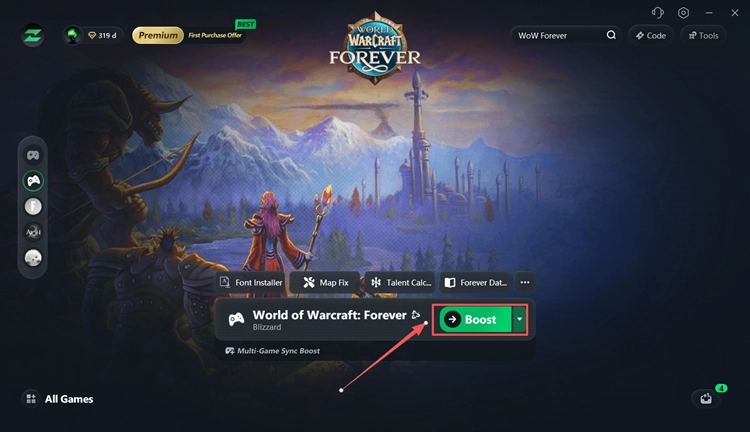
Step 3. Boost WoW Forever
Choose a recommended route and click Boost before launching WoW Forever.
The Bottom Line
When WoW Forever is stuck on Retrieving Character List, check the server status first. The issue may affect multiple players during updates, disconnects, or temporary service disruptions. With the servers running normally, restart Battle.net and WoW Forever, run Scan and Repair, clear the cache, and check your connection. For high ping, lag spikes, or unstable routing, download LagZapper to help optimize your route to the game server.
FAQs About WoW Forever Retrieving Character List
Q1. Why is WoW Forever stuck on Retrieving Character List?
This usually happens because of server issues, maintenance, Battle.net problems, corrupted game files, cache errors, or an unstable connection.
Q2. How do I fix WoW Forever Retrieving Character List?
Check the server status first. Then restart Battle.net and WoW Forever, run Scan and Repair, clear the cache, and test your connection.
Q3. Why is my WoW Forever character list not loading?
The character list may fail to load when the character service is unavailable or your local game files, cache, or connection have problems.
Q4. Can WoW Forever server issues cause Retrieving Character List?
Yes. When many players are stuck on Retrieving Character List at the same time, the issue is more likely related to the game servers or character service.
Q5. Does Scan and Repair fix WoW Forever stuck loading characters?
It can help when local game files are corrupted or incomplete. It usually will not fix a widespread server-side outage.
Q6. Why is WoW Forever login stuck before character select?
A stuck login can be caused by server disruption, Battle.net issues, unstable routing, or problems loading character data from the game service.