
AION 2 Lag & Freezing: Fix EU Server Lag and Lag Spikes
AION 2 lag can appear as sudden freezes, delayed skills, rubberbanding, or several-second lag spikes before the game catches up. EU players may also experience unstable connections caused by server load, packet loss, ISP routing, or peak-hour congestion. This guide explains the most common causes of AION 2 freezing and gives you five practical ways to improve connection stability and reduce network-related lag.
Why Is AION 2 Lagging or Freezing?
AION 2 lag usually comes from server load, poor routing, packet loss, or local network issues.
- Server Load: Heavy traffic or temporary instability can cause freezes and delayed actions.
- Poor AION 2 Routing: Congested network paths can trigger lag spikes even when average ping looks normal.
- Packet Loss and Jitter: Lost or delayed packets can cause rubberbanding, rollback, and skill delay.
- Local Network Issues: Wi-Fi interference, weak signals, or unstable connections can increase latency.
- Background Traffic: Downloads, streaming, backups, and updates can make AION 2 lag worse.
AION 2 EU Lag and Freezing Issues
AION 2 EU players have reported several-second freezes, lag spikes, rubberbanding, and position rollback on servers such as Nania and Phernos.
| Symptom | More Likely Cause |
|---|---|
| Several players freeze together | Server instability or heavy load |
| Only some players are affected | ISP or routing issue |
| Rubberbanding or rollback | Packet loss or jitter |
| FPS stays normal during freezes | Network or server issue |
| Lag worsens during busy periods | Peak-hour congestion |
When several players freeze at the same time, AION 2 server lag is more likely. When only some players are affected, routing or ISP issues are more likely.
[Quick Way] Reduce AION 2 Lag with LagZapper
When AION 2 is online but freezing, lag spikes, or rubberbanding continue, the connection route between your PC and the game server may be unstable. LagZapper is most useful when the server is online but your connection suffers from route-specific latency, packet loss, or instability.
Why Use LagZapper for AION 2?
- Reduce AION 2 Lag: Optimize routing to reduce AION 2 lag spikes, sudden freezes, and unstable gameplay.
- Lower AION 2 Ping: Improve the connection path to reduce AION 2 high ping, latency spikes, and delayed actions.
- Reduce AION 2 Packet Loss: Stabilize routing to reduce AION 2 packet loss, rubberbanding, rollback, and skill delay.
- Optimize AION 2 Routing: Avoid congested network paths to improve connection stability between your PC and AION 2.
How to Reduce AION 2 Lag with LagZapper
Set up LagZapper in three simple steps:
Step 1. Download LagZapper
Download and install LagZapper for Windows.
Step 2. Search for AION 2
Open LagZapper, sign in, search for AION 2, and select the game.
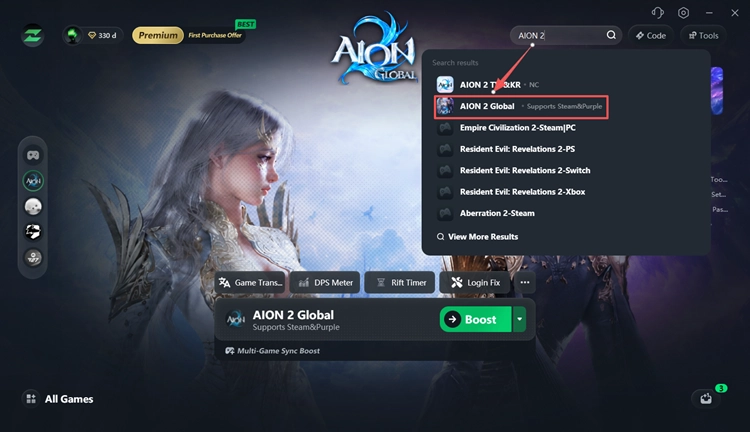
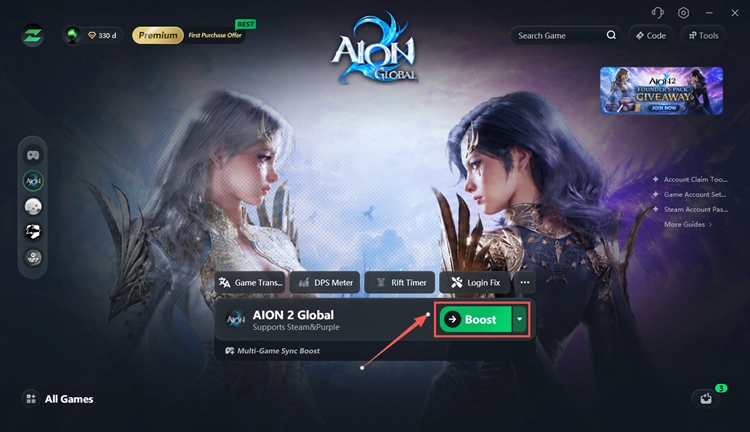
Step 3. Select a Node and Boost
Choose an optimized node, click Boost, and launch AION 2.
Repeated disconnects, login drops, or missing network data may point to a broader AION 2 disconnecting issue rather than ordinary lag.
How to Fix AION 2 Lag and Freezing
Try these fixes when AION 2 keeps freezing, rubberbanding, or showing sudden lag spikes.
Fix 1. Check AION 2 Server Status
Check whether AION 2 servers are down before changing local settings. Review these official sources for maintenance, outages, or temporary server issues:
- Official AION 2 Website
- AION 2 Service Notices
- Official AION 2 Discord
- AION 2 Steam News
When the issue affects many players at the same time, wait for the server to stabilize before changing Windows, router, or other local network settings.
Fix 2. Restart Your Router and Stop Background Traffic
Background traffic can increase latency and make AION 2 lag spikes worse.
Step 1. Restart your modem and router.
Step 2. Pause downloads, streaming, cloud backups, game updates, and large uploads.
Step 3. Press Ctrl + Shift + Esc, check the Network column in Task Manager, and close unnecessary apps using high bandwidth.
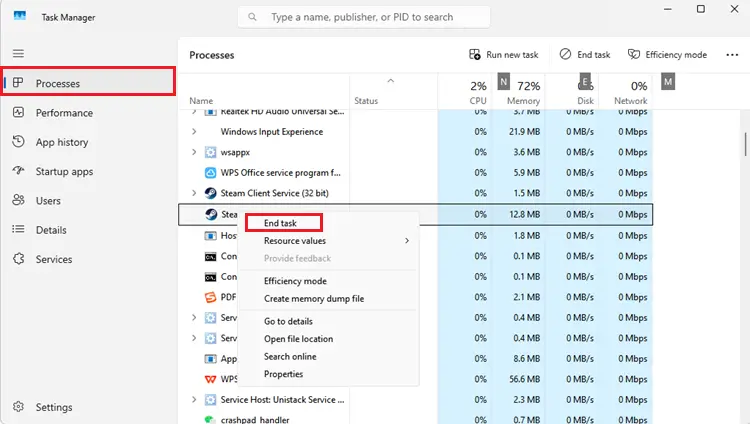
Launch AION 2 again and check whether freezing, rubberbanding, or delayed actions improve.
Fix 3. Use Ethernet Instead of Wi-Fi
Wi-Fi interference can cause packet loss, jitter, and unstable latency, making AION 2 lag or rubberbanding worse. Connect your PC directly to the router with an Ethernet cable whenever possible.
When Ethernet is unavailable:
- Move closer to the router.
- Use a 5 GHz or 6 GHz Wi-Fi network.
- Disconnect unnecessary devices.
- Pause large downloads while playing.
When AION 2 runs more smoothly on Ethernet, Wi-Fi instability was likely contributing to the lag.
Fix 4. Reset Your Windows Network
Windows network or DNS issues can contribute to unstable AION 2 connections.
Step 1. Search for cmd, right-click Command Prompt, and select Run as administrator.
Step 2. Run these commands one at a time:
- ipconfig /flushdns
- netsh winsock reset
- netsh int ip reset
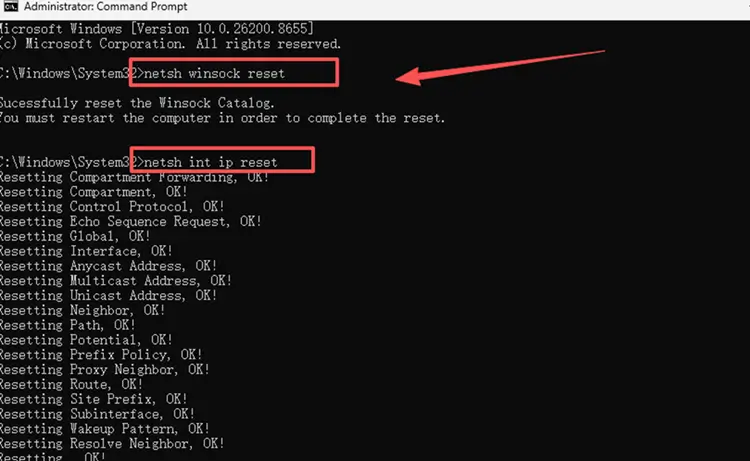
Step 3. Restart your PC, launch AION 2, and check whether the lag spikes or freezing improve.
Fix 5. Test a Different Network Route
AION 2 routing may be the problem when other players on the same server play normally but you keep freezing or rubberbanding. Common signs include:
- Only some players are affected.
- Ping looks normal between freezes.
- Rubberbanding appears suddenly.
- The issue improves after changing routes.
Testing a different network path can help confirm whether ISP routing is contributing to AION 2 lag.
The Bottom Line
AION 2 lag and freezing can come from server instability, packet loss, poor routing, or local network problems. Check the server first when several players freeze together, then restart your network, stop background traffic, use Ethernet, and reset Windows networking. When AION 2 lag spikes or rubberbanding are caused by unstable routing, download LagZapper to optimize the connection path and improve gameplay stability.
FAQs About AION 2 Lag
Q1. Why is AION 2 lagging in EU?
AION 2 EU lag may come from server instability, ISP routing, packet loss, or peak-hour congestion. Different players can experience different connection quality on the same server.
Q2. Why does AION 2 freeze for several seconds?
AION 2 freezing can happen when game data is delayed by server issues, packet loss, jitter, or unstable routing.
Q3. Is AION 2 lag caused by the server or my internet?
When several players freeze together, server lag is more likely. When only a few players are affected, local network or ISP routing issues are more likely.
Q4. Why does AION 2 lag even with low ping?
Low average ping does not rule out packet loss, jitter, or short routing interruptions, which can still cause lag spikes and rubberbanding.
Q5. How do I fix AION 2 lag spikes?
Check the server, restart your router, stop background traffic, use Ethernet, reset Windows networking, and test a different route.
Q6. Can packet loss cause AION 2 rubberbanding?
Yes. AION 2 packet loss can delay movement data and cause rubberbanding, rollback, delayed skills, and unstable movement.