
AION 2 Server Transfer: Dates, Free Transfer, Rules & Requirements
The AION 2 server transfer service is opening in October 2026, allowing eligible players to move their characters to another server within the same region and faction. Early Access server transfers begin after the October 13 PDT / October 14 CEST maintenance, while Launch Server transfers open one week later.
The base AION 2 server transfer is free, but players must meet several requirements involving character level, Legion status, mail, Market items, server capacity, and character slots. This guide covers the official server transfer dates, schedule, requirements, restrictions, and steps for transferring to another AION 2 server.
When Does AION 2 Server Transfer Start?
The AION 2 server transfer rollout happens in two stages.
| Server Type | Available From | Available Until |
|---|---|---|
| Early Access Servers | After October 13 PDT / October 14 CEST maintenance | Before October 20 PDT / October 21 CEST maintenance |
| Launch Servers | After October 20 PDT / October 21 CEST maintenance | Before October 27 PDT / October 28 CET maintenance |
The October 13/14 maintenance starts at October 13, 11:30 PM PDT / October 14, 8:30 AM CEST and is expected to last about 3.5 hours. Early Access transfers should open once maintenance ends.
Note: Only Early Access servers can use the transfer service during the first week. Launch Servers become eligible in the second week.
AION 2 Server Transfer Time by Region
The AION 2 server transfer time varies by region, and transfer applications are only available during specific daily windows.
| Region | Daily Transfer Window |
|---|---|
| NA East | 09:00–13:00 and 15:00–19:00 PDT |
| NA West | 09:00–13:00 and 15:00–19:00 PDT |
| Europe | 03:00–07:00 and 09:00–13:00 PDT |
| South America | 09:00–13:00 and 15:00–19:00 PDT |
| Asia | 20:00–00:00 and 02:00–06:00 PDT |
Outside these windows, AION 2 server transfer may not be available. Transfers can also close early when server capacity limits are reached.
Is AION 2 Server Transfer Free?
Yes. The AION 2 server transfer cost is 0 Quna during this transfer period.
| Item | Cost |
|---|---|
| Server Transfer | 0 Quna |
| Per Character | 0 Quna |
| Additional Character Slot | 1,000 Quna |
| Purchase Limit | Once per account |
Multiple eligible characters can be transferred in one request. The destination server must have enough character slots. For example, moving six characters with only four slots available requires two extra slots, costing 2,000 Quna.
AION 2 Server Transfer Requirements
Before starting an AION 2 server transfer, make sure your characters meet these requirements:
- Reach Level 10 or higher: Only Level 10+ characters can transfer.
- Stay in a village: Transfers are unavailable in the Abyss, a Spacetime Rift, or a dungeon.
- Leave your Legion: Leave your Legion and cancel any pending Legion applications.
- Complete Duty Missions: Clear all active Duty Missions before submitting a transfer.
- Clear Market activity: Remove listings, collect items, and claim all sale proceeds.
- Claim Shop Storage items: Collect all stored items, including Founder’s Pack rewards.
- Clear your mailbox: Claim all remaining mail and attached items before transferring.
All AION 2 server transfer requirements must be cleared before the purchase option becomes available.
AION 2 Server Transfer Rules
The main AION 2 server transfer rules are:
- Transfers are limited to the same region.
- The destination server must support the same faction.
- Early Access characters can only move between Early Access servers during their transfer period.
- Launch Servers follow a separate transfer schedule.
- Server Transfer can be used once per account during the event.
- Each request moves characters from one origin server to one destination server.
- Multiple eligible characters can be included in one request.
- Availability depends on transfer-in and transfer-out capacity.
Tip: Not sure where to move? Check the AION 2 server list before submitting your transfer.
How to Transfer Servers in AION 2
Once the transfer service opens, follow these steps to transfer servers in AION 2:
Step 1. Prepare Your Characters
Make sure the characters you want to transfer are Level 10 or higher and located in a village. Leave your Legion, clear active Duty Missions, and collect all pending Market, Shop Storage, and mailbox items.
Step 2. Open Server Transfer
Go to In-Game Shop > Server Transfer during your regional purchase window. According to the official AION 2 Server Transfer notice, the purchase button activates once you meet the transfer requirements.
Step 3. Choose a Server and Characters
Select an eligible destination server in the same region and faction, then choose the characters to transfer.
Tip: Early Access characters can only transfer to another Early Access server. Extra character slots cost 1,000 Quna per slot.
Step 4. Review and Confirm
Check the server, characters, and any extra slot cost, then submit the transfer request.
Note: Once processing starts, you will return to the title screen and temporarily be unable to log in. Completed transfers cannot be canceled or reversed.
What Transfers to the New AION 2 Server?
Most character progression, currencies, and character-based data transfer to the new server, including:
- Character data
- Cube inventory and Character Storage
- Skills and Stigmas
- Quests and exploration progress
- Achievements, titles, and wings
- Abyss Points, Arcana, and Theostones
- Pets and Closet Skins
- Crafting records and gathering proficiency
- Season Mission progress and Season Ranking Points
- Membership and Character Daeva Pass progress
- Friends and Blocked lists
Kina in your character inventory and Character Storage also transfers. Quna and Mileage are moved and combined with any existing balance on the destination server.
What Does Not Transfer?
Items in Server Storage do not transfer to the new server. Move important items to your Cube inventory or Character Storage before transferring.
Server Storage expansion records may carry over, but the stored items stay behind. Expanded character slots also remain on the original server and do not become free slots on the destination server.
What Happens to Your Character Name After Server Transfer?
Your AION 2 character name does not transfer directly to the destination server. After the server transfer, each character will temporarily be renamed @TemporaryName, and you must choose a new name when logging in for the first time.
You can reuse your previous name when it is still available on the destination server. Server population and faction limits can also affect character availability, so players moving to crowded servers may want to check current AION 2 character creation restrictions before confirming the transfer.
[Bonus] High Ping After an AION 2 Server Transfer?
An AION 2 server transfer can change the network route between your PC and the new server. Poor routing or congestion may lead to high ping, lag spikes, packet loss, or delayed skills even when your internet speed looks normal. LagZapper helps optimize the route to the AION 2 server for a more stable connection.
Why Use LagZapper for AION 2?
- Lower AION 2 High Ping: Optimize routing to reduce latency and improve response times for AION 2 high ping.
- Reduce AION 2 Packet Loss: Improve route stability to reduce rubberbanding, delayed actions, and AION 2 packet loss.
- Reduce AION 2 Lag Spikes: Maintain a more stable connection during combat, PvP, raids, and crowded areas.
- Optimize AION 2 Server Routes: Select a recommended node to improve the connection to your current AION 2 server.
How to Boost AION 2 with LagZapper
Follow these three steps to optimize your connection after changing servers.
Step 1. Install LagZapper
Download and open LagZapper on your Windows PC.
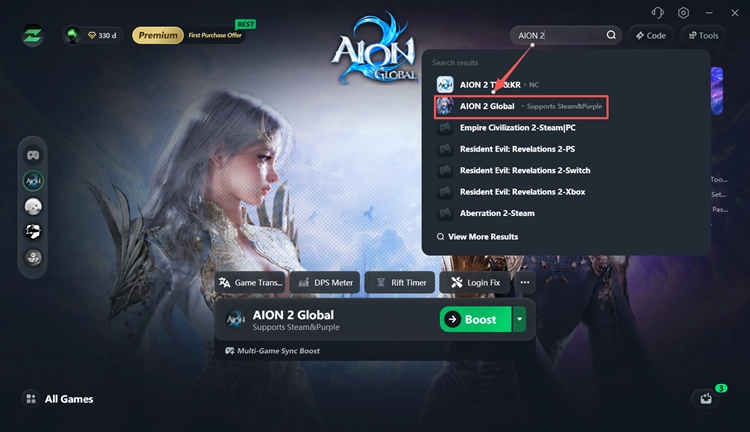
Step 2. Search for AION 2
Search for AION 2 and select the game.
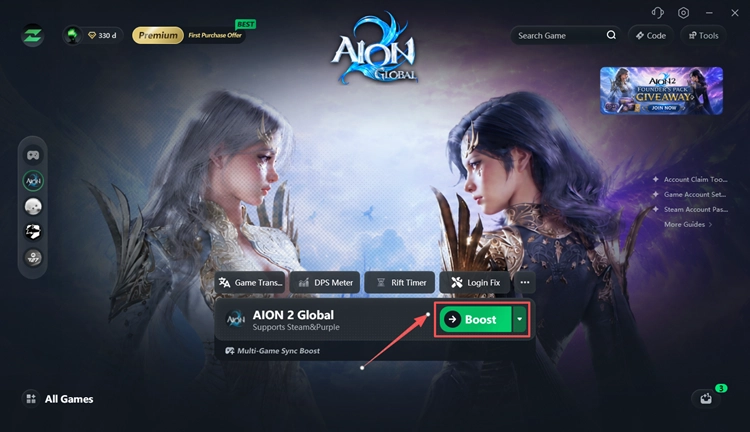
Step 3. Select a Node and Boost
Choose a recommended node and click Boost, then launch AION 2.
Also Read: AION 2 Servers Down? Check Status & Fixes
The Bottom Line
The AION 2 server transfer service opens first for Early Access Servers after the October 13 PDT / October 14 CEST maintenance, with Launch Servers following one week later. The base transfer costs 0 Quna, but all characters must meet the official requirements before applying.
Before confirming, clear mail, Market activity, Legion restrictions, and important Server Storage items. Also check the destination server carefully, since transfers are limited by region, faction, server capacity, and the once-per-account rule.
FAQs About AION 2 Server Transfer
Q1. When does AION 2 server transfer start?
Early Access transfers begin after the October 13 PDT / October 14 CEST maintenance. Launch Server transfers open one week later.
Q2. Is AION 2 server transfer free?
Yes. The base transfer costs 0 Quna. Additional destination character slots cost 1,000 Quna each when needed.
Q3. Can I transfer multiple AION 2 characters?
Yes. Multiple eligible characters from the same origin server can be included in one transfer, as long as the destination has enough character slots.
Q4. Why is AION 2 Server Transfer not available?
The transfer window may be closed, the server may have reached capacity, or your characters may not meet all transfer requirements.
Q5. Does Server Storage transfer to the new server?
No. Items in Server Storage do not transfer. Move important items to Cube inventory or Character Storage first.
Q6. Can I cancel an AION 2 server transfer?
No. Once the transfer is completed, it cannot be canceled or reversed.
Q7. Will my AION 2 character name change after server transfer?
Yes. Your character will be renamed @TemporaryName, and you must choose a name at first login.
Q8. How long does an AION 2 server transfer take?
At least 1 minute, though busy periods may take longer. You cannot log in while the transfer is processing.