
WoW Forever Ruleset Unavailable? 5 Fixes to Try
Getting the "This ruleset is temporarily unavailable" error in WoW Forever? Some players find all gameplay rulesets, including Normal, PvP, Roleplay, and Roleplay-PvP, greyed out after waiting in the login queue. Others get stuck on ruleset selection or face another queue after reconnecting.
The WoW Forever ruleset unavailable issue surfaced during the November 4 global launch, with similar reports appearing on Reddit. This post covers the possible causes and five fixes to help you access the game.
Why Is WoW Forever Ruleset Unavailable?
Following the November 4, 2026, global launch, some players reported that WoW Forever rulesets were unavailable even after completing the login queue. The Normal, PvP, Roleplay, and Roleplay-PvP options appeared greyed out, preventing players from entering the game. Possible causes include:
- Server Congestion: Heavy launch traffic may delay access to gameplay rulesets.
- Ruleset Service Issues: Specific rulesets may be offline or temporarily unavailable.
- Outdated Game Client: Pending Battle.net updates may cause separate connection problems.
- Account or Region Issues: Incorrect account or region settings may affect game access.
When all rulesets are greyed out, server-side availability should be checked first.
How to Fix WoW Forever Ruleset Unavailable
Try these five fixes to troubleshoot WoW Forever ruleset selection issues.
Fix 1. Check WoW Forever Server Status
When all WoW Forever rulesets are unavailable or greyed out, the issue may be server-related. Check for ongoing outages before changing your game settings. Follow these steps:
Step 1. Visit the official WoW news page or check Battle.net announcements for server updates.
Step 2. Browse r/wowforever for recent reports of ruleset selection issues.
Step 3. Wait for the affected rulesets to become available, then try logging in again.
Note: Server-side ruleset outages cannot be fixed through local PC or network settings. Check our WoW Forever servers down guide for related server and connection issues.
Fix 2. Relog and Rejoin the WoW Forever Login Queue
Some players on Reddit reported that reconnecting helped resolve the WoW Forever ruleset unavailable error. Rejoining the login queue may refresh the ruleset selection screen. Follow these steps:
Step 1. On the Ruleset Selection screen, click Cancel to return to the login screen.
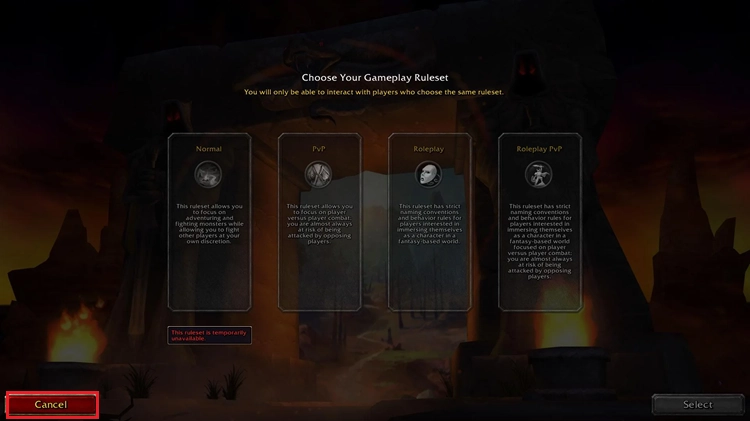
Step 2. Reconnect to WoW Forever and rejoin the login queue.
Step 3. Once the queue finishes, check whether Normal, PvP, or other rulesets are available.
Note: Relogging may reset your queue position, so avoid repeated reconnects during heavy congestion and check our WoW Forever login queue guide for more tips.
Fix 3. Restart Battle.net and Check for Updates
An outdated game client may cause connection issues after launch-day updates. Restarting Battle.net and installing pending updates can help rule out client-related problems. Follow these steps:
Step 1. Close WoW Forever and exit Battle.net completely.
Step 2. Reopen Battle.net, select World of Warcraft, and click the gear icon next to Play > Check for Updates.
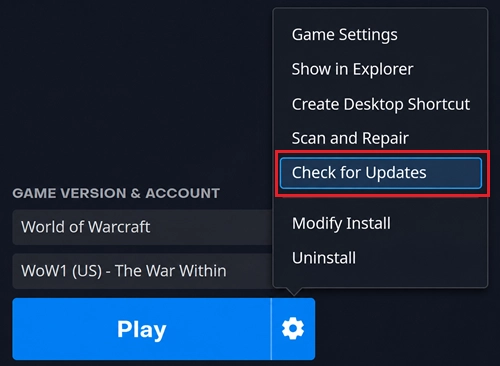
Step 3. Install any available updates, relaunch WoW Forever, and check whether the rulesets are accessible.
Fix 4. Try Another Available Gameplay Ruleset
Some WoW Forever rulesets may become available before others. Switching to an accessible ruleset can help you determine whether the issue affects all rulesets. Follow these steps:
Step 1. Open the Choose Your Gameplay Ruleset screen.
Step 2. Select an available ruleset, such as Normal or PvP.
Step 3. Once inside, use the Ruleset menu to check whether your preferred ruleset is accessible.
Note: Characters cannot transfer between rulesets. For related issues, see our WoW Forever name reservation not working guide.
Fix 5. Verify Your Battle.net Account and Region
An incorrect Battle.net account or game region may cause access issues. Check your account settings to rule out account-related problems. Follow these steps:
Step 1. Open Battle.net and select World of Warcraft.
Step 2. Confirm that your WoW account has access to WoW Forever and the correct region is selected.
Step 3. Select the correct game version, launch WoW Forever, and check whether the rulesets are available.
[Bonus] Reduce WoW Forever Lag and Connection Issues with LagZapper
Once WoW Forever rulesets become available, players may still experience high ping, packet loss, or unexpected disconnects. LagZapper is a PC game network optimizer designed to improve connection stability, reduce network-related lag, and deliver smoother gameplay.
Why Use LagZapper for WoW Forever?
- Lower WoW Forever Ping: Fix WoW Forever high ping with optimized routes for faster in-game response.
- Reduce WoW Forever Lag: Improve connection quality to reduce lag and minimize network-related delays.
- Reduce WoW Forever Packet Loss: Optimize network routes to reduce packet loss and improve connection reliability.
- Fewer WoW Forever Disconnects: Maintain a more stable connection and minimize unexpected gameplay interruptions.
- One-Click WoW Forever Boost: Select a game server and optimize your network connection with a single click.
How to Use LagZapper for WoW Forever
Follow these three steps to optimize your WoW Forever connection with LagZapper.
Step 1. Download, Install, and Sign In
Download LagZapper for Windows, complete the installation, and sign in to your account.
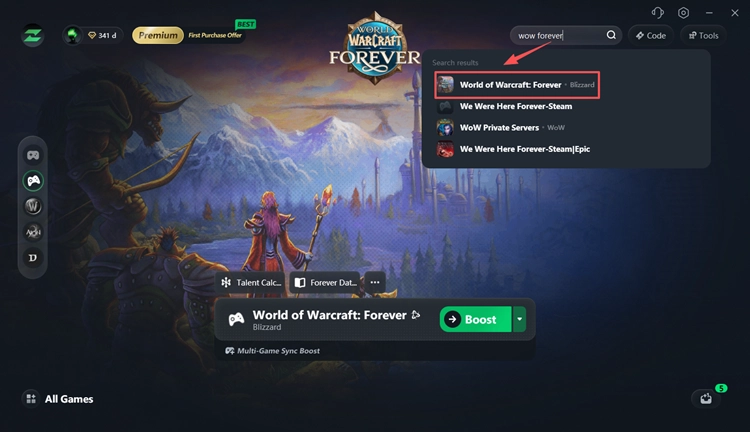
Step 2. Search for WoW Forever
Open LagZapper and search for WoW Forever in the supported games list.
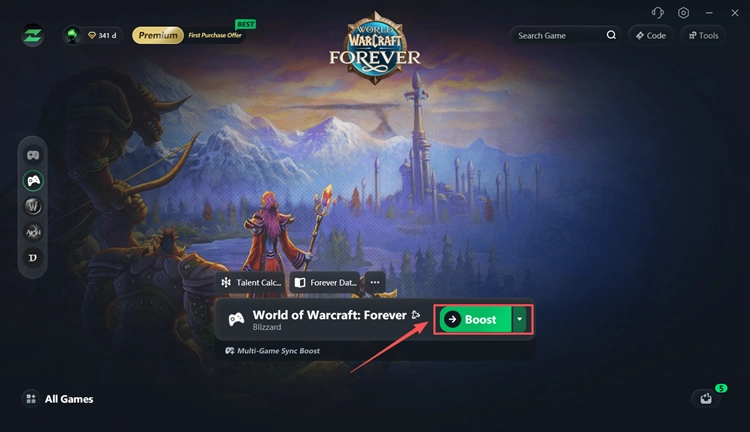
Step 3. Select a Server and Boost
Choose a suitable server or node, click Boost, and launch WoW Forever with an optimized network connection.
The Bottom Line
The WoW Forever ruleset unavailable error is often linked to temporary server issues or unavailable gameplay rulesets. Check the server status first, then try reconnecting, updating Battle.net, or selecting another available ruleset. Avoid unnecessary reinstalls during widespread outages.
Once you're in the game, download LagZapper to optimize your network connection, reduce high ping and packet loss, and enjoy smoother WoW Forever gameplay.
FAQs About WoW Forever Ruleset Unavailable
Q1. Why are all WoW Forever rulesets unavailable?
Server congestion or temporary ruleset service issues may prevent players from selecting gameplay rulesets, especially during launch.
Q2. How do I fix "This ruleset is temporarily unavailable" in WoW Forever?
Check server status, restart Battle.net, and try reconnecting. Server-side outages may require waiting for service restoration.
Q3. Why can't I select a ruleset in WoW Forever?
Server congestion or unavailable ruleset services may leave selection options greyed out. Check for other available rulesets or pending game updates.
Q4. Should I wait or relog when WoW Forever rulesets are greyed out?
Waiting is safer during heavy congestion, as relogging may reset your queue position without resolving the issue.
Q5. What does WOW51900309 mean in WoW Forever?
WOW51900309 typically indicates that no realms are currently available. Check server status and retry once services recover.
Q6. Is WoW Forever ruleset selection down for everyone?
Not always. Availability may vary by region and ruleset, so some players may enter the game while others remain stuck on ruleset selection.